
The Developer’s Guide to Fixing Core Web Vitals and Boosting Performance
Understanding Core Web Vitals and Their Impact
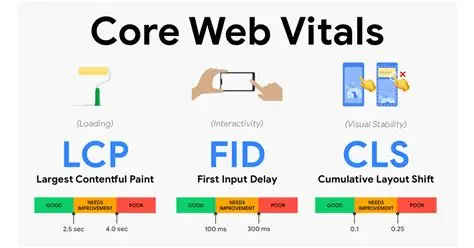
Core Web Vitals represent a set of metrics that Google uses to evaluate user experience on websites. These metrics measure loading performance, interactivity, and visual stability. Understanding what each vital means is crucial for developers aiming to improve page load speed and overall website performance. Poor Core Web Vitals scores can negatively impact your search rankings and user satisfaction, making it essential to address them proactively.
The three primary Core Web Vitals are Largest Contentful Paint (LCP), First Input Delay (FID), and Cumulative Layout Shift (CLS). Each metric targets different aspects of user experience and requires specific optimization strategies. By addressing these metrics comprehensively, you’ll create a faster, more responsive website that users and search engines appreciate.
Measuring Your Current Performance Metrics
Before implementing fixes, you need accurate baseline measurements. Use Google PageSpeed Insights, Chrome DevTools, and Web Vitals JavaScript library to collect real user data. These tools provide insights into how your website performs across different devices and network conditions. Understanding your current performance metrics helps identify priority areas for optimization.
Chrome DevTools offers detailed performance profiling capabilities, allowing developers to trace JavaScript execution, analyze rendering timelines, and identify bottlenecks. The Web Vitals library sends metric data directly from real users, giving you authentic performance data rather than simulated results. This distinction is critical because real-world performance often differs significantly from lab testing.
How to Fix Core Web Vitals: Practical Strategies
Improving Core Web Vitals requires a multi-faceted approach combining code optimization, asset management, and server-side enhancements. Start by implementing lazy loading for images and off-screen content. This defers resource loading until users actually need them, significantly improving initial page load speed. Next, implement responsive image strategies using srcset and picture elements to serve appropriately sized images for different devices.
Image optimization deserves special attention since images typically comprise 50% of page weight. Compress images without losing quality using WebP format for modern browsers while maintaining PNG or JPEG fallbacks. Consider implementing progressive image loading where low-quality placeholders appear while high-quality versions load. These strategies directly impact LCP scores and overall perceived performance.
Reducing JavaScript Execution Time
JavaScript represents the largest performance culprit for most modern websites. Reducing JavaScript execution time directly improves Core Web Vitals scores and user experience. Audit your JavaScript bundles using webpack-bundle-analyzer to identify unnecessary dependencies and code. Remove polyfills for features supported by your target browsers, as these add unnecessary weight.
Code splitting is essential for reducing JavaScript execution time on initial page load. Separate your bundle into critical path code and deferred modules loaded on demand. Implement dynamic imports for route-specific code in single-page applications, ensuring users only download JavaScript they actually need. This technique dramatically reduces main thread blocking time and improves responsiveness.
Minification and compression must be paired with effective caching strategies. Enable gzip or brotli compression on your server to reduce file transfer sizes. Implement service workers to cache JavaScript bundles locally, reducing bandwidth usage for returning visitors. Modern bundlers like Webpack and Vite include tree-shaking capabilities that eliminate dead code, further reducing bundle sizes.
Optimizing Critical Rendering Path
The critical rendering path determines how quickly browsers can render pages. Minimize the number of critical resources by deferring non-essential stylesheets and scripts. Use async and defer attributes on script tags strategically. Async scripts load in parallel but execute immediately upon completion, potentially blocking rendering. Defer scripts wait until HTML parsing completes before executing, preserving initial page rendering speed.
Inline critical CSS directly in the HTML head to ensure essential styling applies immediately. Extract this critical path CSS separately from your main stylesheet and include it inline in the head section. This technique ensures above-the-fold content renders properly without waiting for external CSS files. Defer non-critical styles to load asynchronously after page content renders.
Improving Page Load Speed Code Optimization
Improve page load speed through server-side rendering (SSR) or static site generation (SSG) where applicable. These approaches pre-render content on the server, delivering HTML directly to browsers rather than requiring JavaScript execution for content display. This significantly improves perceived performance and helps search engines understand your content immediately.
Implement HTTP/2 server push to proactively send critical resources before browsers request them. Configure your server to push stylesheets, fonts, and essential JavaScript files alongside initial HTML delivery. This technique eliminates round-trip delays associated with discovering and requesting these resources, directly improving page load metrics.
Monitoring and Continuous Improvement
Performance optimization isn’t a one-time task. Establish continuous monitoring using tools like Google Analytics, Sentry, and custom Web Vitals reporting. Set performance budgets to prevent regressions when adding new features or dependencies. Configure automated alerts when metrics exceed thresholds, enabling rapid response to performance issues.
Regularly audit third-party scripts and integrations, as these often introduce significant performance overhead. Evaluate whether each third-party service provides sufficient value to justify its performance cost. Consider alternatives that might offer similar functionality with less overhead.
Conclusion
Fixing Core Web Vitals requires understanding performance metrics and implementing targeted optimizations. By reducing JavaScript execution time, optimizing images, improving the critical rendering path, and continuously monitoring performance, you’ll create faster, more responsive websites. These improvements benefit both users and search rankings, making performance optimization a worthwhile investment for any development team.
To bridge the gap between back-end rendering metrics and responsive front-end execution, you can read our specialized blueprint on Mobile-First Web Development and Responsive Websites
. Additionally, you can cross-reference your structural milestones with the live environment benchmarks detailed in the official Google PageSpeed Insights Documentation.

Leave a Reply