Google Search Console Analytics and Performance Tracking: A Complete Guide
What is Google Search Console and Why It Matters
Google Search Console, often called GSC, is your direct line of communication with Google about how your website appears in search results. If you’re serious about SEO, this tool is non-negotiable. It’s like having a dashboard that shows you exactly what Google thinks about your site, how often it appears in searches, and what issues might be holding you back from ranking higher.
Think of it as your website’s health check-up. Without it, you’re basically flying blind when it comes to understanding your organic search performance. GSC gives you insights that you simply can’t get anywhere else, making it absolutely essential for anyone wanting to improve their search visibility.
Getting Started with Your Google Search Console Guide
Setting up Google Search Console is straightforward, but getting the most out of it requires understanding what each feature does. First, you’ll need to verify ownership of your website. Google offers several verification methods, including HTML file upload, DNS record modification, or connecting your Google Analytics account if you already have one set up.
Once you’re verified, take time to explore the interface. The main sections you’ll want to focus on are Performance, Coverage, Enhancements, and Tools & Settings. Each section provides different insights into how your website is performing in Google search results. Don’t just set it up and forget about it—regular monitoring is key to maintaining and improving your rankings.
Track SEO Metrics That Actually Matter
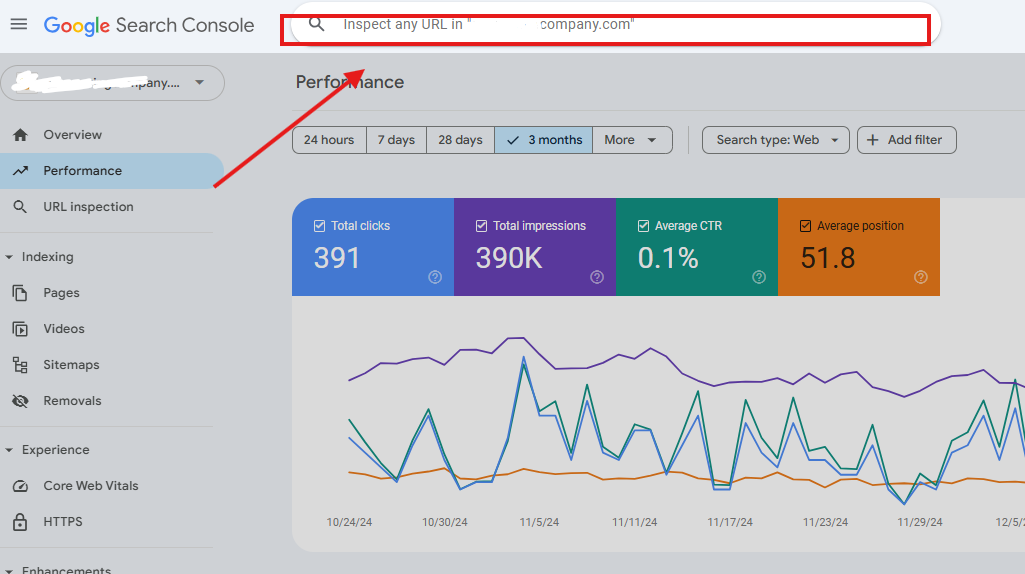
When it comes to tracking SEO metrics, GSC offers several critical data points. Impressions show how many times your pages appeared in search results, regardless of whether someone clicked. Clicks indicate how many people actually visited your site from Google search. Position tells you the average ranking of your pages for specific queries.
These three metrics form the foundation of understanding your organic search performance. If you’re getting impressions but few clicks, it might mean your title tags or meta descriptions need improvement. If your position is high but clicks are low, your click-through rate is suffering. By analyzing these metrics together, you can identify where optimization efforts will have the biggest impact.
Pay attention to trends over time. Are your impressions growing? Is your average position improving? These patterns help you understand whether your SEO efforts are working or if you need to adjust your strategy. Create a monthly habit of reviewing these metrics to stay on top of your performance.
Analyze Organic CTR to Boost Click-Through Rates
Organic click-through rate, or CTR, is the percentage of people who see your page in search results and actually click on it. This metric is crucial because it directly impacts your traffic. A page might rank in position three but have a terrible CTR if the title tag or meta description isn’t compelling enough.
In Google Search Console, you can filter your data to see CTR by query, page, country, device type, and more. This granular analysis is powerful. For example, you might discover that your CTR on mobile devices is significantly lower than desktop, indicating you need to optimize your mobile snippets.
To improve your organic CTR, focus on writing compelling title tags and meta descriptions that accurately represent your content while enticing users to click. Include your target keywords naturally, but remember that user intent matters more than keyword placement. Test different variations and monitor how changes affect your CTR over time using GSC data.
Fix Indexing Errors GSC Reports
One of the most valuable features in Google Search Console is the Coverage report, which shows you indexing issues. Not all pages you want indexed are actually being indexed by Google, and GSC tells you exactly which ones have problems and why. This is where you can find and fix indexing errors GSC identifies.
The Coverage report categorizes your pages into four statuses: Indexed, Excluded, Error, and Valid with warnings. The Error category is where you need to focus your attention immediately. Common indexing errors include server errors, redirect errors, noindex tags, and robots.txt blocking. Each error has a specific fix that depends on the root cause.
Server errors usually mean Google couldn’t access your page. Check your hosting provider and server logs. Redirect errors occur when there’s a chain of redirects or a redirect to a 404 page. Keep redirects simple and direct. Pages marked as noindex won’t be indexed unless you remove that tag. The key is to regularly check this report and address issues promptly because indexing errors directly impact your organic visibility.
Using Performance Data to Optimize Your Content
Beyond identifying problems, GSC performance data should drive your content optimization strategy. Look for queries where you’re ranking in positions 4-10. These are golden opportunities because you’re already close to being on the first page. Small improvements to these pages—better content, stronger internal links, improved CTR optimization—could push them into the top three positions.
Similarly, examine pages with high impressions but low CTR. These pages are getting visibility, so the problem isn’t ranking; it’s convincing people to click. Revise the title tag and meta description to be more compelling and relevant to the search query. This low-hanging fruit often yields quick wins.
Creating an Actionable GSC Monitoring Strategy
Successful SEO requires consistent monitoring and action. Set up weekly or monthly reviews of your Google Search Console data. Create a simple spreadsheet to track key metrics over time. Monitor your top-performing pages, watch for new errors in the Coverage report, and identify optimization opportunities.
Use GSC in conjunction with other tools like Google Analytics to get the complete picture. GSC tells you what happened in search results; Google Analytics shows what users did on your site. Together, these tools provide comprehensive insights into your organic search performance and user behavior.
Remember, Google Search Console is free and it’s information directly from Google itself. Make mastering this tool a priority in your SEO efforts, and you’ll have a significant advantage in understanding and improving your search rankings.
Useful Resources
-
Internal Link: To expand your audience even further after mastering your local tracking, check out our comprehensive International SEO & Global Traffic Expansion Guide.
-
External Link: For the official platform setup, configuration guidelines, and technical documentation, visit the Google Search Console Official Portal.
Leave a Reply