
Web Development Tips: How to Clean Code and Fix Core Web Vitals
Understanding Core Web Vitals and Website Performance
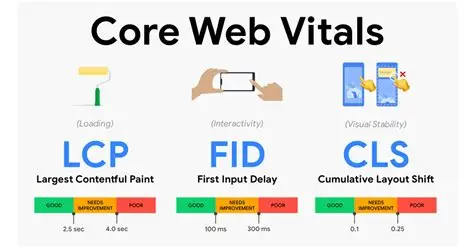
Core Web Vitals are essential metrics that Google uses to evaluate user experience on your website. These three metrics—Largest Contentful Paint (LCP), First Input Delay (FID), and Cumulative Layout Shift (CLS)—directly impact your search rankings and user satisfaction. When your website performs well on these metrics, visitors enjoy faster loading times, smoother interactions, and better overall experience. Many website owners struggle with these metrics because they lack knowledge about how to optimize website speed effectively. Understanding these fundamentals is the first step toward improving your site’s performance and search engine visibility.
How to Optimize Website Speed: The Fundamentals
Optimizing website speed requires a multi-faceted approach that combines technical improvements with smart coding practices. Start by analyzing your current performance using Google PageSpeed Insights, GTmetrix, or WebPageTest. These tools identify specific bottlenecks affecting your site’s speed. The most common issues include uncompressed images, render-blocking resources, and inefficient code. To how to optimize website speed effectively, prioritize improvements based on impact. Focus on compressing images without losing quality, implementing lazy loading for below-the-fold content, and minimizing CSS and HTML files. These foundational steps often provide the most significant performance improvements with minimal effort.
Core Web Vitals Fix for Beginners: Step-by-Step Guide
Beginners often feel overwhelmed by core web vitals terminology, but fixing them follows a logical progression. For Largest Contentful Paint (LCP), ensure your server responds quickly and optimize images aggressively. Images typically account for the largest content elements on a page. Convert images to modern formats like WebP, use responsive images with srcset attributes, and serve images from a CDN for faster delivery. For First Input Delay (FID), minimize JavaScript execution and defer non-critical scripts. For Cumulative Layout Shift (CLS), reserve space for ads and dynamic content to prevent unexpected layout changes. Core web vitals fix for beginners becomes manageable when you address these issues systematically rather than trying to solve everything simultaneously.
Reducing JavaScript Execution Time in WordPress
WordPress sites frequently struggle with excessive JavaScript that slows performance. To reduce javascript execution time wordpress effectively, audit all active plugins and remove those that aren’t essential. Many plugins load unnecessary scripts throughout your entire site, even on pages where they’re not needed. Use plugin management tools to defer non-critical JavaScript and eliminate render-blocking scripts. Consider using a performance optimization plugin like WP Rocket, Autoptimize, or Perfmatters to automate this process. These tools can defer JavaScript loading, lazy load scripts, and minify code automatically. Additionally, review theme files for unnecessary JavaScript. Sometimes custom themes include bloated frameworks or redundant libraries that can be removed. Testing after each change ensures you don’t break functionality while reducing javascript execution time wordpress.
Clean Coding Practices for Fast Loading Websites
Clean coding practices directly impact website loading speed and maintainability. Well-organized, efficient code requires fewer resources to process and execute. Start by writing semantic HTML that clearly defines content structure without unnecessary wrapper elements. Avoid inline styles and large style blocks; instead, use external CSS files that browsers can cache. Minimize the number of HTTP requests by combining files where possible and using CSS sprites for multiple images. Keep your CSS selectors simple and avoid deeply nested rules that increase specificity and processing time. In JavaScript, write modular, reusable functions instead of monolithic blocks. This approach makes code easier to maintain and optimize. Remove unused CSS and JavaScript regularly using tools like PurgeCSS and webpack. These clean coding practices for fast loading not only improve performance but also make your codebase more professional and easier for other developers to understand.
Minification and Code Compression Strategies
Minification removes unnecessary characters from code without changing functionality. Minified files are significantly smaller, reducing bandwidth consumption and improving load times. Most modern development tools automate minification during the build process. Enable gzip compression on your server to further reduce file sizes during transmission. Browsers automatically decompress gzipped files, so users experience faster downloads without compatibility issues. Implement these compression strategies across all file types: HTML, CSS, and JavaScript. Combined, minification and gzip compression typically reduce file sizes by 60-80%, which translates directly to faster page loads and improved core web vitals metrics.
Testing and Monitoring Your Improvements
Continuous testing ensures your optimization efforts work effectively. Use monitoring tools to track core web vitals over time and identify regressions quickly. Set up alerts for significant performance drops so you can address issues immediately. Compare before-and-after metrics to quantify the impact of your changes. Real User Monitoring (RUM) data from Google Analytics provides insight into how actual visitors experience your site, complementing synthetic testing tools. Regular testing reveals how code changes, plugin updates, or hosting changes affect performance. Document your findings and maintain a performance optimization checklist for ongoing maintenance.
Conclusion
Mastering web development through clean code and core web vitals optimization requires dedication but delivers substantial returns. By understanding how to optimize website speed, implementing core web vitals fix for beginners, reducing javascript execution time wordpress, and following clean coding practices for fast loading, you’ll create a website that ranks better and delights users. Start with fundamental improvements, test continuously, and refine your approach based on real performance data. The investment in these practices pays dividends through improved search rankings, reduced bounce rates, and increased user satisfaction.
Leave a Reply