
What is RAID Server Storage? Complete Guide to RAID Levels
Understanding RAID Server Storage Basics
If you’re running a server or managing hosting infrastructure, you’ve probably heard the term RAID thrown around. But what exactly is RAID server storage, and why should you care about it? RAID stands for Redundant Array of Independent Disks, and it’s basically a way to combine multiple hard drives into a single system to improve performance and protect your data.
Think of RAID as your data’s bodyguard. It uses different strategies to keep your information safe from hard drive failures, which happen more often than you might think. A typical hard drive has a lifespan measured in years, but when you’re running a server 24/7, component failure becomes a real concern that shouldn’t be ignored.
The Critical Role of Server Data Redundancy
Server data redundancy is the backbone of reliable hosting. Without it, a single hard drive failure could mean losing all your data permanently. Redundancy means you have backup copies of your data spread across multiple drives, so if one fails, you’re not left in the dark.
Most modern hosting providers understand this and implement some form of RAID configuration. It’s not just about peace of mind either—data loss can cost your business thousands in recovery attempts, downtime, and damaged reputation. That’s why choosing the right RAID level for your specific needs is crucial.
RAID 0: Maximum Speed, Zero Safety
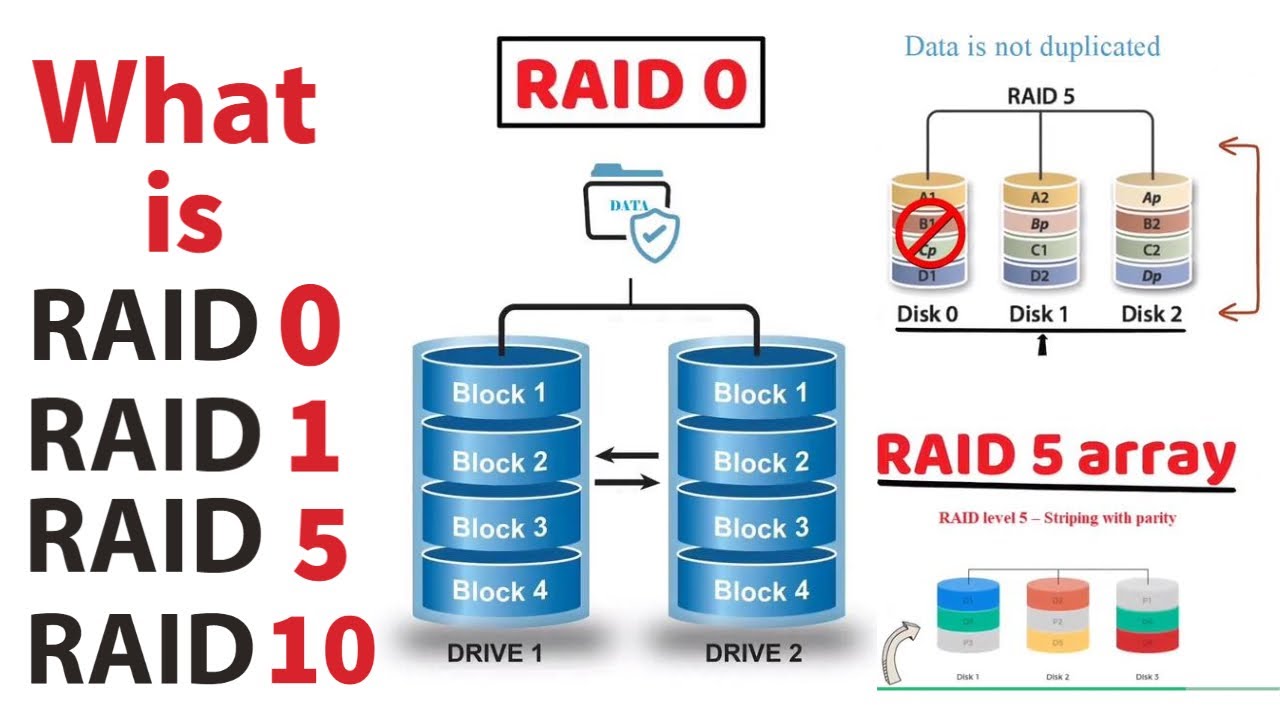
RAID 0, also called striping, spreads your data across multiple drives to boost read and write speeds. When you write data, it gets split across all the drives in the array, so operations happen faster than with a single drive.
Here’s the catch: RAID 0 offers zero redundancy. If even one drive fails, you lose everything. Your data is gone. This configuration is popular for gaming rigs or temporary data storage where speed matters more than safety, but it’s definitely not recommended for server hosting where your data needs protection. For critical business infrastructure, RAID 0 is basically a hard drive failure waiting to happen.
RAID 1: Perfect Mirror, Simple Protection
RAID 1 is straightforward and effective. It creates an exact duplicate of your data on two drives—think of it as a mirror. Whatever you write to one drive instantly appears on the other. If one drive fails, you switch to the other without losing a single file.
The downside is cost and efficiency. You need two drives to store the same amount of data as one drive, meaning you’re paying double for storage capacity. RAID 1 also doesn’t improve read speeds significantly and writes are slightly slower since data must be written to both drives. It’s reliable and simple, making it great for small servers or situations where you want straightforward hard drive failure protection without complexity.
RAID 5: The Sweet Spot for Most Servers
RAID 5 is where things get interesting. It combines the speed benefits of striping with protection through parity data. Your information is spread across at least three drives, with calculated parity data distributed across all of them. This means you can lose one drive and still recover all your data.
The math works like this: if you have four 1TB drives in RAID 5, you get about 3TB of usable storage because one drive’s worth of space is used for parity information. Performance is excellent for read operations, and you get solid hard drive failure protection. Most medium-sized hosting operations choose RAID 5 because it balances cost, performance, and reliability beautifully.
The only real limitation is that rebuilding after a drive failure takes time, sometimes several hours for large drives. During this rebuild window, your server is more vulnerable if another drive fails. It’s rare, but it happens.
RAID 10: Enterprise-Grade Reliability
RAID 10 combines the best of RAID 1 and RAID 0 in a nested configuration. You create mirrored pairs of drives, then stripe across those pairs. This means you get the speed of striping with the redundancy of mirroring.
The advantage is robust hard drive failure protection and excellent performance. You can lose multiple drives simultaneously and still survive, as long as you don’t lose both drives from the same mirrored pair. Recovery is also fast since you’re only pulling from a mirrored partner, not recalculating parity like in RAID 5.
The tradeoff is storage efficiency and cost. Like RAID 1, you’re using 50% of your drives for redundancy. RAID 10 requires at least four drives, making it more expensive than RAID 5. However, for enterprise-level hosting with high performance demands and critical data, RAID 10 is absolutely worth the investment.
Comparing RAID Levels at a Glance
RAID 0 gives you speed but no protection. RAID 1 offers simple mirroring but costs double for storage. RAID 5 provides excellent balance with one drive’s worth of overhead. RAID 10 delivers premium protection and performance but requires significant storage investment.
Your choice depends on your specific needs. Small businesses with tight budgets might start with RAID 1. Growing companies typically move to RAID 5 for better efficiency. Large enterprises often choose RAID 10 because the cost of downtime far exceeds the extra hardware expense.
Choosing the Right RAID Configuration for Your Hosting
When selecting a RAID level, consider three factors: how important is your data, how much downtime can you tolerate, and what’s your budget? A hosting provider should clearly explain what RAID configuration they use and why it suits your service tier.
Many hosts offer multiple options. Budget-friendly shared hosting might use RAID 5, while premium dedicated servers come with RAID 10. Some providers even use RAID 6, which is like RAID 5 but can survive two simultaneous drive failures.
Don’t assume RAID is your only protection either. Real data security requires RAID for redundancy, but also backups in separate geographic locations, monitoring systems that alert you to drive failures, and regular health checks of your storage infrastructure.
If you found this guide helpful and want to dive deeper into server infrastructure options, feel free to check out these highly recommended resources:
Internal Link: https://congresodewebmasters.com/linux-vs-windows-server-hosting/
External Link: https://congresodewebmasters.com/what-is-raid-server-storage-complete-guide-to-raid-levels/
Leave a Reply